Music
Free browser music maker for videos, games and podcasts
Trickbeat is a free music maker in your browser. Build a song in seven steps and change anything until it sounds right. Free for commercial use, no account.
Make a songLoading the player…
Hear what it makes
Podcast or stream intro
Prefer links? The MP3 files
Videos and YouTube
Calm music under a video, tutorial or vlog.
Styles to try
Download it as a WAV and lay it under your video. You choose the style, set the volume of each layer, and swap one layer at a time until it fits.
Good places to start: calm bossa nova (nylon guitar, gentle rhythm) or slow lo-fi (swing and vinyl crackle).
Podcasts and streams
A tune for the start or end of your show.
Styles to try
A full song runs about 30 seconds to 2 minutes. The repeat button in the player plays it again and again.
Good places to start: the playful cat beat or the rat beat for a light, casual show, 90s organ house or driving techno for more drive.
Games
Menu music and level loops for an indie game.
Styles to try
8-bit game music sounds like an old game console. The repeat button in the player loops a finished song.
Good places to start: 8-bit game music for a retro or pixel-art game, slow lo-fi or calm bossa nova for a menu, driving techno or 90s organ house for action or racing, the desert style for a desert or western level. Open a finished 8-bit song in the player.
Slideshows and edits
A steady groove behind a montage or slide deck.
Styles to try
Download a full song from the player and cut it where you need it, or let the repeat button play it again and again.
Good places to start: 90s organ house or driving techno for energy, lo-fi for something quiet.
How it works
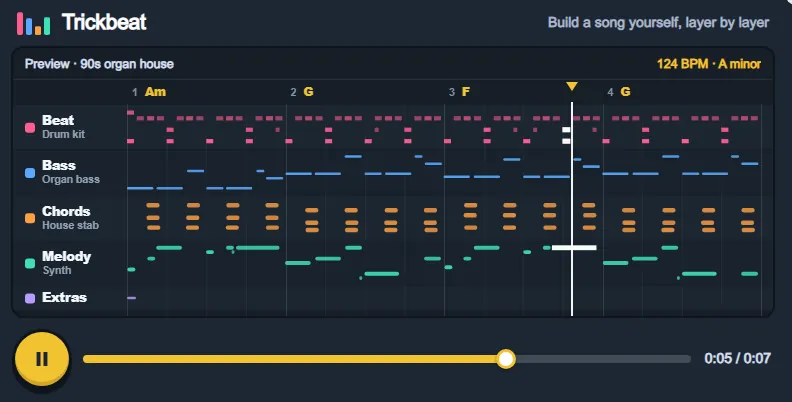
- 1BeatPick a rhythm to nod along to.
- 2BassPick the low notes under it all.
- 3ChordsPick the notes that set the mood.
- 4MelodyPick the tune you could hum.
- 5TricksAdd small touches that stand out.
- 6ArrangeGrow it into a full song.
- 7MixSet each layer's volume, pick your favourite.
About the method
Trickbeat does not generate audio with an AI model. It writes the notes from music-theory rules and common production tricks, and plays them with built-in synthesizers in your browser. At each step you pick one of three options and hear it together with the layers you already have, with links to free lessons from different creators that explain the idea.
Edit it until it feels exactly right
Go back to any step and pick again. Set each layer’s volume, or drop a layer.
More ways to edit
A generated song is a starting point, not a final answer. Everything you picked stays editable:
- Change any step. Press change next to the beat, bass, chords, melody or another step and pick a different option. The other layers stay.
- Swap one layer. Keep the song and try a new melody or another layer only.
- Speed and volume. Change the tempo, set the volume of each layer, or leave a layer out.
- Keep editing outside. The WAV opens in any audio or video editor, so you can cut it to length or add fades there.
See all 12 starting styles
- 8-bit: sounds like an old game console
- Lo-fi: slow and dusty, with swing and vinyl crackle
- 90s organ house: organ bass and punchy chord hits
- Techno: driving, with punchy chord hits in between
- Rat beat: brass slides and squashed drums
- Reggaeton: a bouncy beat with a singing monk
- Bossa nova: nylon guitar and a calm rhythm
- Cat beat: a playful beat with a meowing synth
- Christmas: sleigh bells and a shuffle
- Pedal pop: a pop melody over long held notes
- Odd count: a groove that counts to five instead of four
- Desert: tense, like a western film
A Christmas song fits a holiday video, and the desert style a desert level.
Commercial use, licence and credit
This is the license wording: music made with Trickbeat is free to use, also commercially: games, videos, streams and personal projects. The wording sets no limit on the kind of commercial project, so a game you sell, a monetised YouTube channel, a podcast or a client job all fall under "also commercially".
Credit is appreciated, not required. Some music tools make you credit them; Trickbeat does not. If you want to give one, this is the suggested line:
Music: Trickbeat (vibecodingnederland.nl/projecten/trickbeat)
You need no account. Nothing is uploaded: the song is written and rendered on your own device.
Questions
Is Trickbeat free?
Yes. Trickbeat is free, with no account and no paid upgrades. The music you make with it is yours to use, also commercially.
Do I need an account?
No. There is no sign-up and no login. Open the page and start. Songs are made on your own device and nothing is uploaded.
Can I edit a song after it is made?
Yes. Every choice stays editable: go back to any of the seven steps and pick another option, swap one layer such as the melody while the rest stays, try new melodies, change the tempo, set the volume of each layer or leave a layer out. Then download the WAV, and edit it further in any audio or video editor if you like.
Which file format do I get?
A WAV file of the full song. The download button in the player saves it from your browser. WAV is the only export for now: no MP3 or MIDI yet.
Can I use it on YouTube without copyright claims?
You can use the music in YouTube videos, also monetised ones, because the license allows commercial use. Trickbeat writes its own notes and plays them with built-in synthesizers, so a song is not cut from an existing recording. No tool can promise that an automated claim system will never flag a track, because those systems belong to other companies.
Does it work offline or on a phone?
It works on a phone-sized screen. It has been tested in Chrome on a computer and at phone size, and not yet in Safari on an iPhone. There is no offline mode: open the page with a connection first, then the song is made on your device.
For developers and AI agents
Manual for AI assistants and scripts: llms.txt. The Node.js 18+ command line is one script: download trickbeat.mjs. For a seamless 4-bar loop file, use the loop option of the command line or the JavaScript API, for example node trickbeat.mjs make --style techno --seed 7 --loop --out loop.wav.
Share or rebuild a song
Every song is defined by a style, a seed and your choices, and a link can carry all three, so the same link always rebuilds the same song. Try /trickbeat/?style=8-bit&seed=7 or /trickbeat/?style=lofi&seed=42. Add &picks=ABAACAA for your choices and &levels=80.100.100.120 for the volumes of drums, bass, chords and lead. The player has no share button yet, so you write the link yourself, or take it from the JavaScript API.
Can I loop it?
Yes. In the player, the repeat button plays a finished song on repeat. For a seamless 4-bar loop file (6.4 seconds in the 8-bit style), use the loop option of the command line or the JavaScript API.
Can AI agents use it?
Yes. There is a manual for AI assistants and scripts, a JavaScript API on the page, WebMCP tools in browsers that support them, and a Node.js 18+ command line. The same style, seed and choices always give the same song.
Style codes for the command line, share links and the API. Every style can be rebuilt with a different seed, from 1 to 999999.
| Style | Sound | BPM | Key |
|---|---|---|---|
8-bit | chiptune: square lead, pulse arpeggios, triangle bass | 150 | C major |
lofi | lo-fi: swing, crunch, vinyl | 80 | E-flat major |
organ-house | 90s organ house: organ bass, house stabs | 124 | A minor |
techno | driving techno with syncopated stabs | 130 | F minor |
rat-beat | brass slides, squashed drums | 120 | D minor |
dembow | reggaeton / dembow with a monk vocal | 94 | B minor |
bossa | bossa nova: nylon guitar, calm clave | 136 | D major |
cat-beat | playful beat with a meowing synth | 108 | F major |
christmas | sleigh bells and a shuffle | 128 | G major |
pedal-pop | pop melody over held notes | 105 | D major |
odd-five | 5/4, felt as 3 + 2 | 140 | E minor |
border-dust | desert tension, harmonic minor | 104 | E harmonic minor |
Status. WAV download only for now.
No MP3 or MIDI export yet. The player runs in your browser with built-in synthesizers. Making a whole song takes a few seconds of computing. Tested in Chrome on a computer and at phone size. Safari on iPhone is not tested yet.